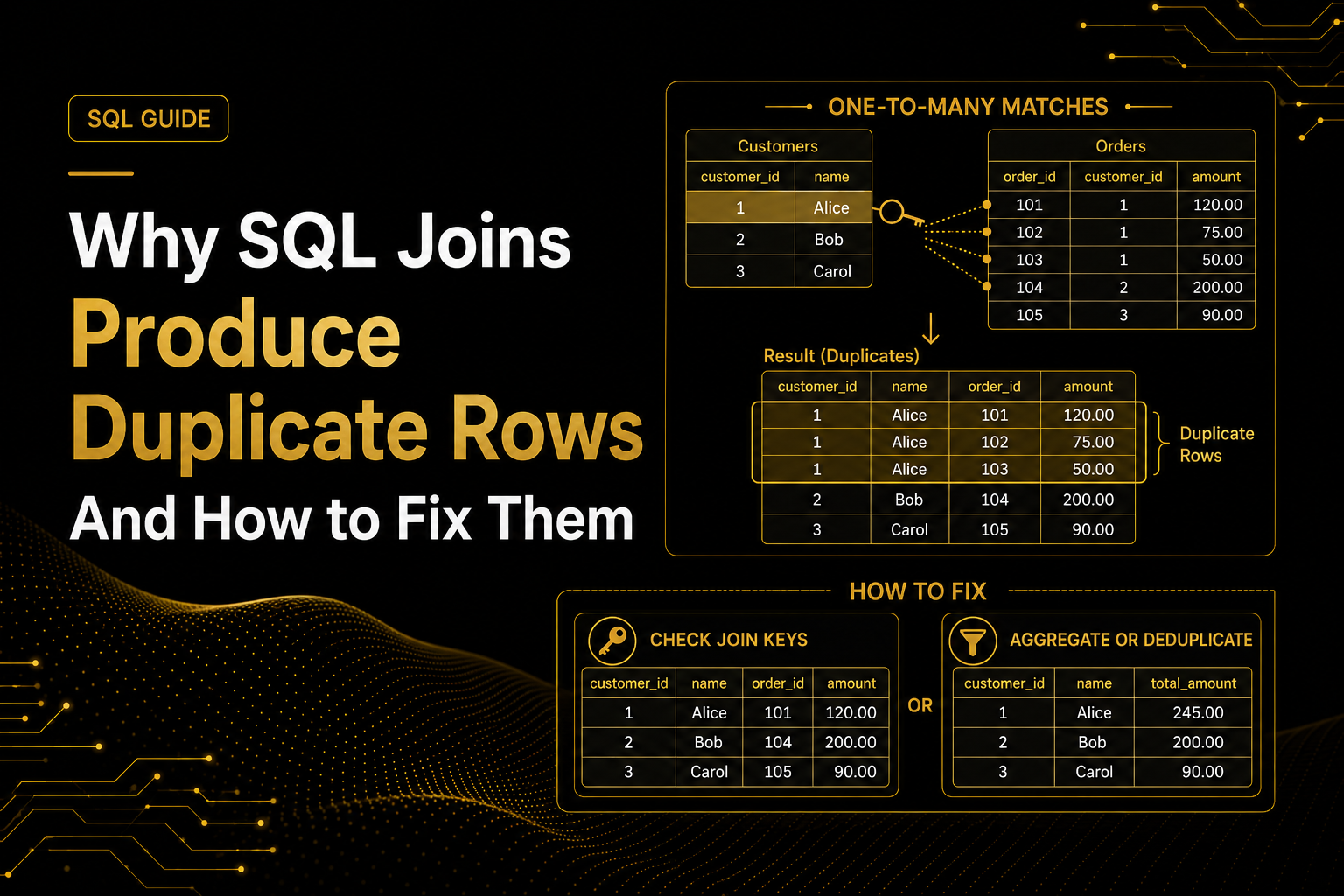
SQL joins allow Data Analysts to combine information stored across different tables. For example, an analyst may join customer details with orders, products, marketing campaigns or payment records.
However, joins can sometimes produce more rows than expected. Customer names may appear several times, sales totals may increase unexpectedly, or dashboard numbers may stop matching the original report.
The first reaction is often to add DISTINCT. But repeated rows are not always errors, and removing them without investigating can produce incorrect results.
Let’s understand this problem through a realistic business example.
Real-World Example: Sales Increased After Joining Two Tables
Imagine an e-commerce company has two tables.
The customers table contains one row per customer:
| customer_id | customer_name |
|---|---|
| 101 | Sarah |
| 102 | David |
| 103 | Maria |
The orders table contains one row per order:
| order_id | customer_id | order_amount |
|---|---|---|
| 5001 | 101 | 120 |
| 5002 | 101 | 80 |
| 5003 | 102 | 150 |
A Data Analyst joins them to create a customer sales report:
SELECT
    c.customer_id,
    c.customer_name,
    o.order_id,
    o.order_amount
FROM customers AS c
LEFT JOIN orders AS o
    ON c.customer_id = o.customer_id;
The result is:
| customer_id | customer_name | order_id | order_amount |
|---|---|---|---|
| 101 | Sarah | 5001 | 120 |
| 101 | Sarah | 5002 | 80 |
| 102 | David | 5003 | 150 |
| 103 | Maria | NULL | NULL |
Sarah appears twice. At first, this may look like a duplicate, but both rows are valid because Sarah placed two different orders.
This is a one-to-many relationship:
- One customer can have many orders.
- Each order creates a separate result row.
- Customer information is repeated for every matching order.
Before removing repeated rows, the analyst must determine whether they represent incorrect duplicates or valid business activity.
Why SQL Joins Produce Duplicate Rows
1. The Join Key Is Not Unique
An analyst may assume that customer_id appears only once in the customer table. However, the table could contain repeated customer records caused by:
- Duplicate data entry
- CRM synchronization problems
- Repeated file uploads
- Multiple versions of the same customer
- An incomplete data-cleaning process
Check whether the expected unique key contains multiple records:
SELECT
customer_id,
COUNT(*) AS record_count
FROM customers
GROUP BY customer_id
HAVING COUNT(*) > 1;
If this query returns results, customer_id is not unique.
Suppose Sarah appears twice in the customers table and has two orders. The join would return four rows:
2 customer records × 2 orders = 4 joined rows
The join is multiplying the matching records from both tables.
2. The Tables Have a Many-to-Many Relationship
Imagine the company also has a customer-support table.
Sarah has:
- Two orders
- Three support interactions
If the analyst joins orders directly with support interactions using only, the result will contain six rows:
2 orders × 3 support interactions = 6 rows
The database returns every possible match between Sarah’s orders and support interactions.
If the report requires one row per customer, summarize each table before joining:
WITH order_summary AS (
SELECT
customer_id,
COUNT(*) AS total_orders,
SUM(order_amount) AS total_sales
FROM orders
GROUP BY customer_id
),

support_summary AS (
SELECT
customer_id,
COUNT(*) AS support_interactions
FROM customer_support
GROUP BY customer_id
)

SELECT
o.customer_id,
o.total_orders,
o.total_sales,
s.support_interactions
FROM order_summary AS o
LEFT JOIN support_summary AS s
ON o.customer_id = s.customer_id;
Each summary now contains one row per customer, preventing unnecessary row multiplication.
3. The Join Condition Is Incomplete
Sometimes a relationship requires more than one joining column.
Suppose monthly sales and employee targets are stored by employee and month. Joining only on employee_id would match every sales month with every target month.
Incorrect join:
SELECT *
FROM monthly_sales AS s
JOIN monthly_targets AS t
ON s.employee_id = t.employee_id;
Correct join:
SELECT
    s.employee_id,
    s.month,
    s.sales,
    t.target
FROM monthly_sales AS s
JOIN monthly_targets AS t
    ON s.employee_id = t.employee_id
   AND s.month = t.month;
The analyst must identify the complete business key. Depending on the dataset, it might be:
- Employee and month
- Customer and date
- Product and location
- Order and product
- Campaign and reporting day
4. The Tables Have Different Levels of Detail
Data Analysts must understand what one row represents in each table. This is known as the table’s grain.
For example:
- Customers table: one row per customer
- Orders table: one row per order
- Order-items table: one row per product within an order
Suppose order 5001 contains three products. Joining the order table to the order-items table will repeat the order-level information three times.
If the analyst then sums order_total from the joined result, the order’s revenue could be counted three times.
The problem is not necessarily the join. The problem is calculating an order-level metric after expanding the data to the product level.
Before joining, ask:
What does one row represent in each table, and what should one row represent in the final report?
How Data Analysts Diagnose the Problem
A practical investigation can follow four steps.
Step 1: Define the Expected Result
Decide what one row in the final dataset should represent.
For example:
- One row per customer
- One row per order
- One row per product
- One row per customer per month
Without this decision, repeated rows cannot be evaluated correctly.
Step 2: Check the Join Keys
Use COUNT() and GROUP BY to determine whether the joining values repeat in either table.
SELECT
    customer_id,
    COUNT(*) AS number_of_orders
FROM orders
GROUP BY customer_id
HAVING COUNT(*) > 1;
Multiple orders may be valid. The purpose is to understand the relationship before performing the join.
Step 3: Compare Counts and Totals
Compare important values before and after the join:
SELECT SUM(order_amount) AS original_sales
FROM orders;
Then calculate the same value after joining:
SELECT SUM(o.order_amount) AS joined_sales
FROM customers AS c
JOIN orders AS o
    ON c.customer_id = o.customer_id;
If joined sales are higher, the join may be multiplying order records.
Step 4: Inspect One Problematic Customer
Instead of reviewing thousands of rows, select one customer producing unexpected results:
SELECT *
FROM customers
WHERE customer_id = 101;

SELECT *
FROM orders
WHERE customer_id = 101;
Examining the related source records often reveals whether the problem is duplicate data, multiple valid transactions or an incomplete join condition.
Why DISTINCT Is Not Always the Correct Fix
Analysts sometimes try:
SELECT DISTINCT
customer_id,
customer_name,
order_amount
FROM joined_data;
This removes rows that are identical across all selected columns, but it may also hide legitimate transactions.
For example, Sarah could place two separate orders worth $100 each. The amounts are identical, but the orders are different.
If order_id is removed and DISTINCT is added, one valid order could disappear from the report.
Use DISTINCT only when:
- You understand why the duplicate rows exist.
- The records are genuinely identical.
- Removing them matches the business requirement.
It should not be used to hide an unexplained join problem.
Choosing the Correct Fix
The solution depends on the cause:
- One-to-many relationship: Keep the rows if each record represents valid activity.
- Incomplete join: Add the missing joining columns.
- Many-to-many relationship: Aggregate each table to the required level before joining.
- Duplicate source records: Apply a clear deduplication rule or correct the source.
- Different table grain: Calculate metrics at the appropriate level.
- Only checking for a match: Consider using
EXISTSinstead of returning every matching row.
For example, if you only need customers who placed at least one order:
SELECT
c.customer_id,
c.customer_name
FROM customers AS c
WHERE EXISTS (
SELECT 1
FROM orders AS o
WHERE o.customer_id = c.customer_id
);
This returns each qualifying customer without expanding the result to one row per order.
How to Answer This in an Interview
An interviewer may ask:
Why does a SQL join produce duplicate rows, and how would you fix it?
A strong answer is:
A SQL join can produce duplicate-looking rows when the joining key is not unique, the tables have a one-to-many or many-to-many relationship, the join condition is incomplete, or the tables have different levels of granularity. I first define the expected grain, check key uniqueness and compare counts and totals before and after the join. Based on the cause, I may correct the join condition, aggregate before joining, deduplicate using a business rule or use
EXISTSwhen I only need to confirm a matching record. I avoid usingDISTINCTuntil I understand why the repeated rows occurred.
This answer demonstrates SQL knowledge, data validation and business reasoning.
Key Takeaway
Repeated rows after a SQL join are not always incorrect. They may represent legitimate customers, orders, products or other business activity.
Before removing them, determine:
- What one row represents in each table
- Whether the joining keys are unique
- What relationship exists between the tables
- What the final dataset should represent
- Whether row counts or business totals changed
A good Data Analyst does not simply remove duplicate-looking rows. They investigate why the rows appeared and choose a solution that preserves accurate business information.